About Page — Content Reference
CMS Path: Pages → About Page
File: content/about.md
The About Page is a simple content page with metadata and a Markdown body.

Page Metadata
| Field | File Key | What It Controls |
|---|---|---|
| Layout | layout | Template used (do not change) |
| Title | title | Browser tab and SEO title |
| Description | description | Meta description |
| Image | image | Social share image |
| Author | author | Page author |
| Keywords | keywords | SEO keywords |
Body
| Field | File Key | What It Controls |
|---|---|---|
| Body | body | Full page content in Markdown |
The body uses a Markdown editor. You can write:
- Headings (
#,##,###) - Paragraphs
- Bold and italic text
- Links
- Lists (bulleted and numbered)
- Images (
) - Code blocks
- Blockquotes
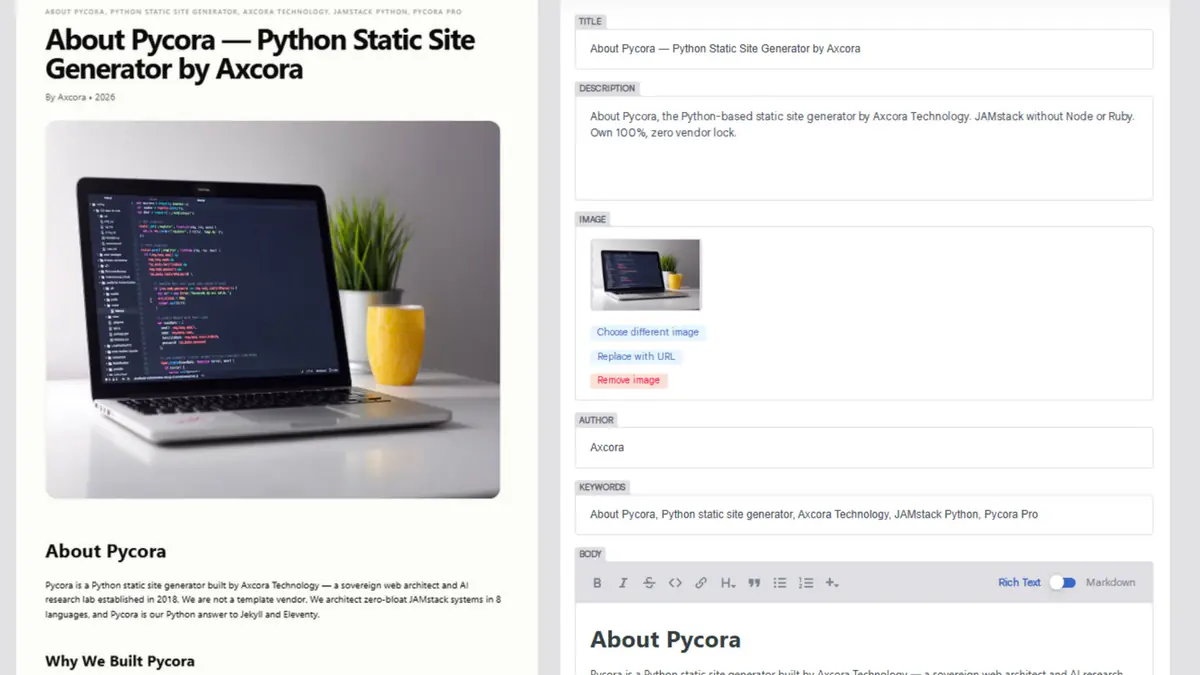
How to Edit the About Page
- Open the CMS at
/admin/ - Click Pages → About Page
- Edit the metadata fields
- Edit the Body using the Markdown editor
- Click Save
Markdown Cheatsheet
| Syntax | Result |
|---|---|
# Heading 1 | Largest heading |
## Heading 2 | Second-level heading |
**bold** | bold text |
*italic* | italic text |
[link](https://example.com) | link |
 | Image |
- item | Bulleted list |
1. item | Numbered list |
> quote | Blockquote |
`code` | inline code |
Best Practices
- Open with a strong first paragraph — the first 2–3 lines matter most
- Use headings — break content into scannable sections
- Add images — visual breaks improve readability
- Keep paragraphs short — 3–4 lines maximum
- End with a call to action — link to Contact or Projects
Suggested Structure
A strong About page usually follows this structure:
- Intro paragraph — who you are, what you do
- Origin story — how you started, why
- What makes you different — values, approach
- Selected work or clients — proof
- Call to action — how to work with you
Troubleshooting
Body content does not appear
- Check that the Body field is not empty
- Save again
- Run
python ssg.pyor wait for the cloud rebuild
Markdown renders as plain text
Check the syntax. Headings need # (with a space). Bold needs **text**.
Image inside body is broken
Confirm the path starts with /img/ and matches a file in static/img/.
About page link is broken
Confirm that about_url in _data/site.yaml points to /about/.
Related
What's Next?
Now let's look at the Contact Page.