Projects Collection — Content Reference
CMS Path: Projects Collections
Folder: content/projects/
Each project is an individual Markdown file in content/projects/. The Projects Page lists them all.
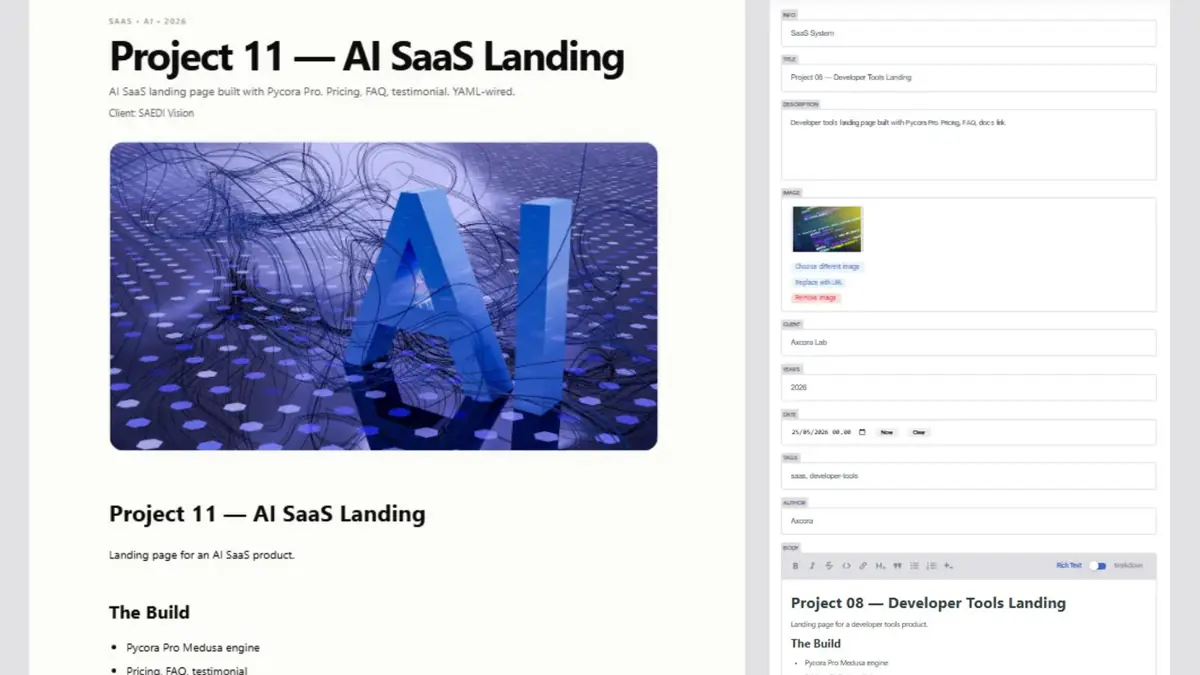
What Is a Project Entry?
A project entry represents a single portfolio item — a case study, a client project, a piece of work.
Each entry has:
- Metadata (title, client, year, etc.)
- A featured image
- A full body (Markdown)
Project Fields
| Field | File Key | What It Controls |
|---|---|---|
| Layout | layout | Template used (do not change) |
| Info | info | Short category label (e.g., "Architecture System") |
| Title | title | Project name |
| Description | description | Short summary for listings and SEO |
| Image | image | Featured image |
| Client | client | Client name |
| Years | years | Project year |
| Date | date | Publish date (used for sorting) |
| Tags | tags | List of tags |
| Author | author | Author name |
| Body | body | Full project content in Markdown |
Field Details
Info
A short label that appears above the project title. Use it to categorize:
- "Architecture System"
- "SaaS Platform"
- "Corporate Identity"
- "Brand Campaign"
Title
The project name. Keep it clear and descriptive.
Description
A one- or two-sentence summary. Used in:
- Project listings
- Meta description for SEO
- Social shares
Image
The featured image for the project. Recommended:
- Format: AVIF or WebP
- Size: 1200×800 or 1600×900
- File size: Under 200 KB
Client
The client or organization the project was for.
Years
The year the project was completed or delivered. Displayed as a string (e.g., "2026").
Date
The publish date. Used for sorting. Format: YYYY-MM-DD.
Tags
A list of tags. Used for:
- Related projects
- Tag pages (auto-generated)
- Filtering
Body
The full project content in Markdown. This is where the case study lives — challenge, approach, result, images, quotes.
How to Create a New Project
-
Open the CMS at
/admin/ -
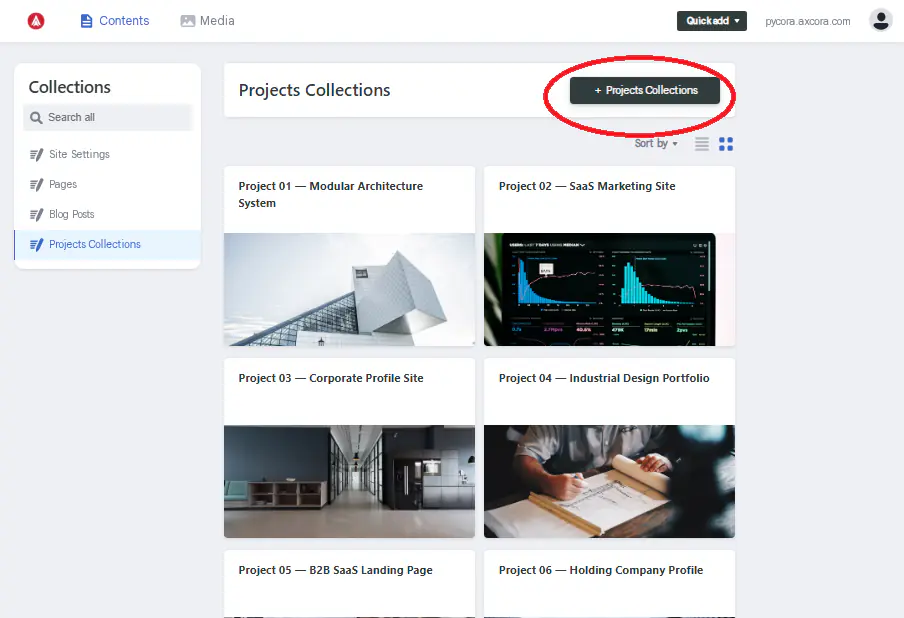
Click Projects Collections in the sidebar
-
Click New Projects Collections at the top
-
Fill in all fields:
- Info
- Title
- Description
- Image
- Client
- Years
- Date
- Tags
- Author
- Body
-
Click Save
The project is saved as a Markdown file in content/projects/. It appears in the Projects listing after the next build.
How to Edit a Project
- Click Projects Collections
- Click the project title in the list
- Edit any field
- Click Save
How to Delete a Project
- Open the project
- Click the three-dot menu at the top right
- Click Delete entry
- Confirm
File Naming
Decap CMS uses the Title field to generate the file name (slug). For example:
| Title | File Name |
|---|---|
| "Project 01 — Modular Architecture" | project-01-modular-architecture.md |
| "Zetta Consulting Profile" | zetta-consulting-profile.md |
You can override the slug if needed by editing the file name manually in Git.
Recommended Body Structure
A strong project body usually follows this structure:
- The Challenge — what problem the client had
- The Approach — what you did
- The Result — what happened, with numbers if possible
- Key Details — tech stack, timeline, team
- Gallery — screenshots, photos, mockups
Use headings (##) to break it into scannable sections.
Best Practices
- Lead with the result — the strongest projects start with impact
- Use real clients and numbers — vague case studies do not convert
- Add images — visual proof beats text
- Keep descriptions short — 1–2 sentences, not paragraphs
- Use consistent tags — helps related projects
- Date accurately — used for sorting
Troubleshooting
Project does not appear in the listing
- Check that the file exists in
content/projects/ - Confirm the frontmatter is valid YAML
- Check that the
datefield is filled in - Rebuild the site
Image does not display
- Confirm the image path starts with
/img/ - Check that the file exists in
static/img/ - Verify the image widget saved correctly
Tags do not create tag pages
- Confirm
tagshas at least one item - Check that the tag pages are generated in
output/tags/ - Rebuild the site
Body content does not appear
- Check the Body field is not empty
- Confirm the Markdown syntax is valid
- Rebuild the site
Slug is wrong
Decap CMS generates the slug from the Title. To customize:
- Rename the file manually in Git
- Or change the Title to influence the slug
Related
What's Next?
Now let's look at Blog Posts.